How to read a World of Warcraft combat log
September 26, 2026 · Updated September 30, 2026
Type /combatlog and the client writes every combat event to a text file on disk. Each line opens with the same eleven fields, and what comes after them depends on the subevent named in the second field.
Turning it on and finding the file
/combatlog toggles logging, and an addon can do the same with LoggingCombat(true). The file lands here:
World of Warcraft\_retail_\Logs\WoWCombatLog.txtIt appends instead of replacing, so a file left running for weeks grows without limit. The first line of a session is a COMBAT_LOG_VERSION record naming the format version and the client build, which is what a parser reads before anything else, because the field layout has changed between expansions.
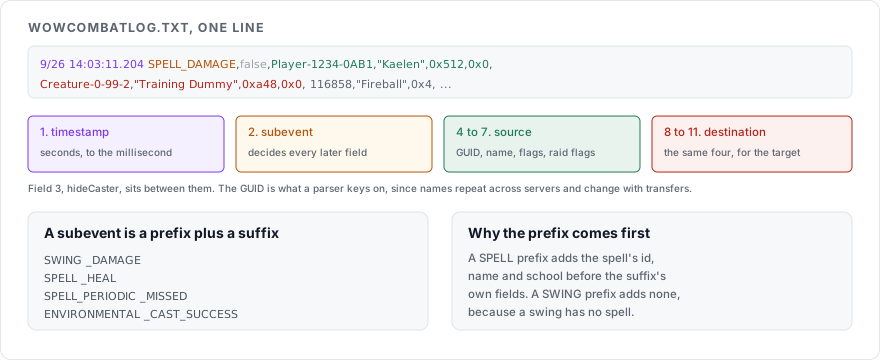
The eleven fields every line begins with
| Position | Field | What it holds |
|---|---|---|
| 1 | timestamp | Unix time in seconds with millisecond precision |
| 2 | subevent | The event type, such as SPELL_DAMAGE |
| 3 | hideCaster | Whether the source is hidden |
| 4 | sourceGUID | Globally unique identifier for the acting unit |
| 5 | sourceName | Its name |
| 6 | sourceFlags | Bits for the unit's type, controller and reaction |
| 7 | sourceRaidFlags | Raid target icon bits |
| 8 | destGUID | Identifier for the unit on the receiving end |
| 9 | destName | Its name |
| 10 | destFlags | The same bits for the target |
| 11 | destRaidFlags | The target's raid icon bits |
The GUID is the field that matters for analysis. Names repeat across servers and change with transfers, while a GUID identifies one unit unambiguously, including which pet belongs to which player.
The flag fields are bitmasks. Testing a bit answers whether the source was a player or an NPC, and whether it was hostile or friendly. Another bit answers whether a player or the game controlled it, which is how a parser separates your damage from your pet's and both from everyone else's.
How subevents are named
Every subevent is a prefix and a suffix joined together, which is why the list looks long while the structure behind it stays small.
| Prefixes | Suffixes |
|---|---|
SWING | _DAMAGE |
SPELL | _HEAL |
SPELL_PERIODIC | _MISSED |
SPELL_BUILDING | _CAST_SUCCESS |
ENVIRONMENTAL | _AURA_APPLIED |
So SPELL_DAMAGE is a spell that dealt damage, SPELL_PERIODIC_HEAL is a heal over time ticking, and SWING_DAMAGE is a melee hit, which carries no spell fields because a swing has no spell.
The prefix decides which fields come next. A SPELL prefix adds the spell's id, name and school before the suffix's own fields, where a SWING prefix adds none. That is why a parser has to read the subevent before it can make sense of field twelve onward.
What advanced logging adds
Advanced combat logging appends around seventeen further fields to each line. They cover health and power, both current and maximum, along with position, facing, item level and other unit state at the moment of the event.
Those fields are what let a log reconstruct where people were standing, which is the difference between knowing a raid took avoidable damage and knowing who walked into it. They also multiply the file size, so turn logging off when you are finished.
Reading one by hand
For a single line, work left to right in three passes. Read the timestamp and subevent to know what kind of event it is. Read the source and destination names to know who did it to whom. Then count into the remaining fields using the prefix and suffix, which tell you what the layout is.
For anything longer than a few lines, hand the file to a parser. The public log sites and the desktop parsers all read this format and reconstruct fights, and they exist because doing it by eye stops scaling at about the third line.
Sources
COMBAT_LOG_EVENT, Warcraft Wiki, for the base parameters, the prefix and suffix grid, and the advanced logging fields
The
COMBAT_LOG_VERSIONline at the head of your own log, which names the format your file usesHow to install a World of Warcraft addon manually, for the addons that turn logging on and read it back