How to secure a login page
September 26, 2026
What a login page needs to get right, as a checklist. Sources at the bottom.
Identifier best practice
Offering multiple choices: username, email or phone number
Email and phone numbers should be verified during signup
The identifier should be unique
Never build queries or commands by concatenating the identifier, use parameterised queries
Email sanitization
An email contains two parts, local@domain, separated by an @
Emails should not contain characters such as backticks and quotes
Domains only contain letters, numbers, hyphens and periods
Local is at most 64 characters
The email is at most 254 characters
Password best practice
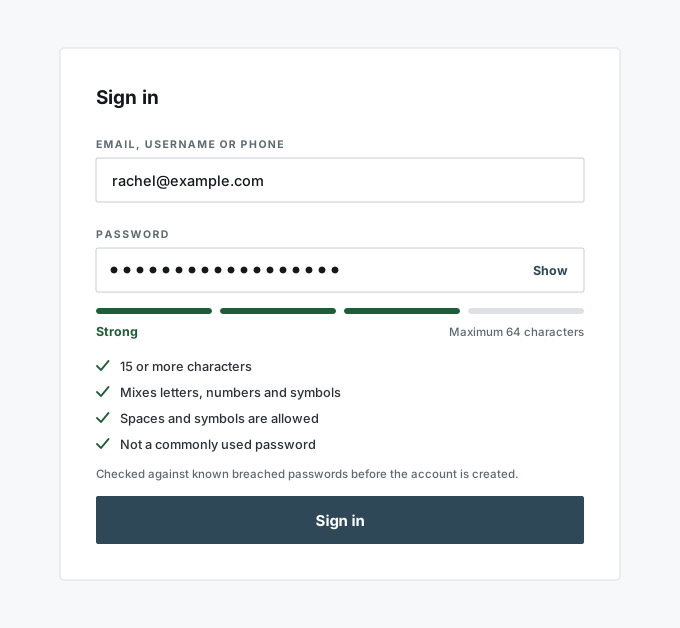
15+ characters if Multi-Factor-Authentication (MFA) is not enabled
8+ characters if MFA is enabled
Allow at least 64 characters
Allow any type of characters including spaces
Blacklist common and breached passwords
Implement a strength meter
No composition rules (forced digits, symbols, uppercase): they make passwords predictable
No forced periodic changes, only after a suspected leak
Treat password field as pure text: no trimming, no lowercasing, never logged, never in a URL
Password storage
Hash with argon2id, or bcrypt where argon2 is not available
Salted, one hash per password
Never store or log the plaintext
Failed login
Rate limit per account and per source address, delay or lock after repeated failures
Same error message for a wrong identifier and a wrong password
Offer MFA, require it for admin accounts
HTTPS only
Session cookie: Secure, HttpOnly, SameSite
CSRF token on the form
Sources
NIST SP 800-63B: password length, blocklist, no composition rules, no periodic changes
OWASP Authentication Cheat Sheet: failed logins, rate limiting, error messages, storage
RFC 5321: the 64 and 254 character limits