How to solder a through-hole joint
September 27, 2026 · Updated September 30, 2026
Heat the pad and the lead together, then feed solder into the joint so the joint melts it. Solder flows toward heat, so touching the wire to the iron instead of to the work is what produces a grey lump sitting on a pad it never wetted.
The four seconds
Rest the tip so it touches the pad and the component lead at once. A tip carrying a small amount of fresh solder conducts heat far better than a dry one.
Count one second, then feed solder wire into the point where the lead meets the pad, on the side away from the iron.
Watch it flow: good solder runs toward the heat and pulls itself into the hole, forming a shape that curves inward.
Remove the wire first and the iron second. Keep the joint still while it solidifies.
The whole joint takes two to four seconds on a small pad. Longer than that lifts pads and cooks components, and shorter leaves a joint that has not wetted.
Temperature
A temperature-controlled iron matters more than a powerful one, because the useful property is how fast the tip recovers after touching cold metal.
| Solder | Tip temperature |
|---|---|
| Leaded, 60/40 or 63/37 | 320 to 350 C |
| Lead-free, SAC305 | 350 to 380 C |
Turning the temperature up to save time works against you. A hotter tip burns the flux off before it can do its job, and flux is what removes the oxide that stops solder wetting.
Keep the tip tinned. A dull, blackened tip transfers almost no heat, and the fix is to wipe it, re-tin it with fresh solder, and park it with solder on it.
What a good joint looks like
The shape to aim for is a smooth fillet curving inward from the pad up to the lead, with the hole filled and the outline of the lead still visible through the solder.
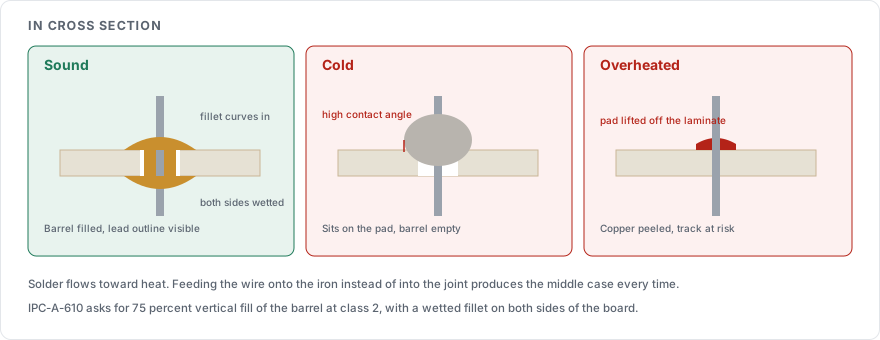
IPC-A-610, the industry acceptance standard for electronic assemblies, sets the criteria formally. For a plated through hole at the usual class 2 level, it asks for 75 percent vertical fill of the barrel and a wetted fillet on both sides of the board.
On leaded solder a sound joint is shiny. On lead-free it is duller and slightly grainy even when correct, so judge the shape instead of the brightness.
The defects and what causes each
| Defect | Looks like | Cause |
|---|---|---|
| Cold joint | Dull, lumpy, ball-shaped, sitting on the pad | The pad or lead was never brought up to temperature |
| Disturbed joint | Frosted or cracked surface | The joint moved while it was solidifying |
| Insufficient wetting | High contact angle, solder beading away from the pad | Oxide on the surface, spent flux, or too little heat |
| Bridge | Solder joining two adjacent pads | Too much solder, or the tip dragged between pads |
| Lifted pad | Copper peeled off the board | Too much heat for too long, usually during rework |
| Icicle or spike | A point of solder pulled up | The iron left the joint after the wire, or left too quickly |
A cold joint is the one worth fearing, because it often conducts at first and fails later with vibration or temperature. Reflow it with fresh flux instead of adding solder on top.
Flux
Flux-cored wire carries enough flux for a first-time joint. Rework needs extra, because the flux in the original joint has already been consumed.
No-clean flux residue is designed to stay on the board and is safe to leave under most conditions. Rosin and water-soluble types are meant to be cleaned off, and leaving water-soluble residue on a board invites corrosion. Check which one you have before deciding to skip the cleaning step.
Order of work
Fit the shortest components first, because each row you solder makes the board harder to lay flat. Resistors and diodes go in before sockets, and connectors go in last.
Clip the leads once the joint has set. A lead gives you something to hold and conducts heat away from a sensitive part while you work, and cutting it flush afterwards avoids nicking the fillet.
Sources
IPC-A-610, the acceptability standard for electronic assemblies, which defines the fill and wetting criteria by class
IPC J-STD-001, the companion requirements for soldered electrical assemblies, including process temperatures
How to read a datasheet, for the maximum soldering temperature and time a part will tolerate