How to verify an email address at signup
September 26, 2026 · Updated September 30, 2026
Accept the address after a light format check, then prove the user can receive mail at it by sending a single-use link. Until that link comes back the address is unverified, and nothing that depends on it should work.
Checking the format
The OWASP Input Validation Cheat Sheet calls email syntax under RFC 5321 "far more complicated than most people realise". A regular expression strict enough to be correct rejects addresses that work, and one loose enough to accept them all validates nothing.
OWASP's recommendation is basic validation followed by the mail server's own verdict: do a light check, then hand the address to the mail server and catch the rejection. A light check confirms four things before the address gets that far:
One
@, with something on each sideA domain of letters, numbers, hyphens and periods
No backticks, quotes or null bytes
Local part at most 63 characters, whole address at most 254
Accept what looks odd but is legal. A plus sign before the @ is how people tag their own mail, and an apostrophe belongs in plenty of surnames. An unfamiliar top-level domain is usually a new registry your regular expression has never heard of.
The token
The verification link carries a token with the same properties as a reset token, and for the same reasons, covered in How to build a password reset flow:
| Property | Value |
|---|---|
| Length | At least 32 characters, OWASP's floor for this token |
| Source | The operating system's cryptographic random source |
| Use | Once, then deleted or marked consumed |
| Lifetime | OWASP suggests around eight hours, which suits mail people read in the evening |
| At rest | Stored as a hash, so a copy of the database holds no live links |
| Scope | One account, and issuing a new one invalidates the previous |
A longer window than a reset token is the right call here. A reset token is a way into an account and expires in 30 minutes. A verification token confirms a mailbox, and an expiry that beats the user to their inbox produces a support message and no security benefit.
The link
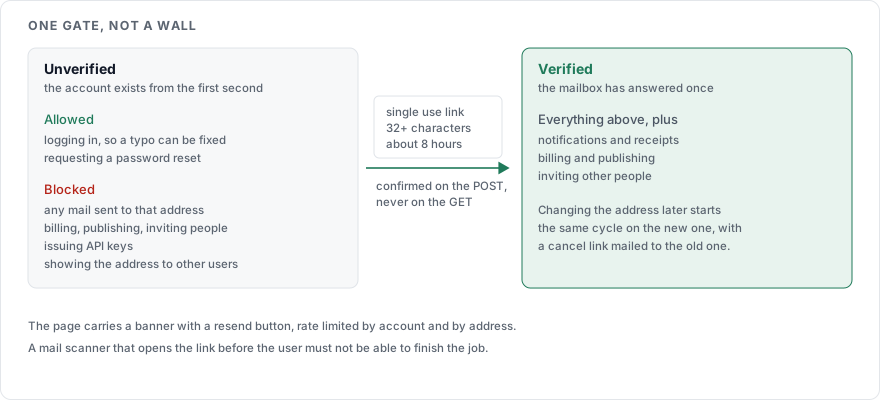
Serve the link over HTTPS to a page with a confirm button, and do the verification on the POST. A link that acts on GET is consumed by whatever opens mail before the user does: scanners, link previews, antivirus fetchers. Each of those marks the address verified with no human involved, which defeats the one thing the step was for.
Set Referrer-Policy: no-referrer on that page and load nothing from a third party on it, so the token is not handed to anyone's analytics.
Let the user ask for another one. The resend button is rate limited by account and by address, per How to rate limit a login page, because a resend costs you an email and costs an attacker using your form as a mailer nothing.
What to gate on verification
| Action | Before the address is verified |
|---|---|
| Logging in | Allowed. A user who mistyped their address needs to get in to fix it |
| Marketing or notification email to that address | Blocked, until the address is proven |
| Billing, publishing, inviting other people, issuing API keys | Blocked. These are the actions where a wrong address becomes someone else's problem |
| Showing the address to other users | Blocked |
| Requesting a password reset | Allowed. It goes to the address on file either way |
Show the state as a banner with the resend button in it, on every page, and not as a modal the user dismisses once and never sees again.
Saying nothing about who is registered
The verification response is one sentence whatever happened:
If that address can receive mail, a link is on its way.
The signup form is the exception, and a deliberate one. We tell the user when an address is already registered, because a signup form that accepts a taken address and continues produces a confused person with no account. That leaves registration as an enumeration point by design, which is the decision recorded in How to write a login error message, alongside the alternatives if you would rather not take it.
Changing the address later
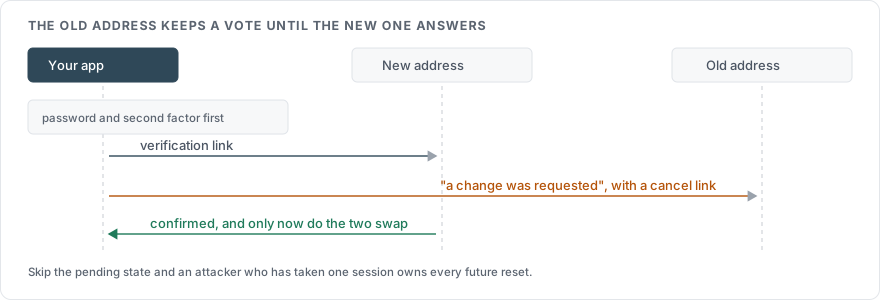
The new address gets verified before it replaces the old one, or an attacker who has taken a session changes the address, verifies nothing, and owns the recovery path.
Store the new address as pending, leaving the current one in place.
Send the verification link to the new address.
Send a notice to the old address saying a change was requested, with a link that cancels it.
Swap them when the new address confirms, and email both.
Require the password, and a second factor if one is enrolled, before step 1.
What to leave out
Do not sign the user in from the verification link. A link that signs them in is a magic link, which is an authentication mechanism with its own token rules and its own expiry.
Do not expire it in 15 minutes. People read mail late, and the resend loop you are forcing on them is worse than the longer window.
Do not delete unverified signups without saying so. If you clear them after 30 days, the page says 30 days.
Do not block the login until verification, unless a regulator requires it. The cost lands on the user who typed one letter wrong, and they cannot correct it from outside.
Sources
OWASP Input Validation Cheat Sheet, the format advice, the length limits, and the token properties for an activation link
RFC 5321, the syntax the light check deliberately does not reimplement
OWASP Forgot Password Cheat Sheet, the single-use hashed token pattern and the generic response
OWASP Authentication Cheat Sheet, on account enumeration through registration