How to check a password against known breaches
September 26, 2026 · Updated September 30, 2026
The check takes one request, and the password never leaves your server. Hash it with SHA-1, ask the Pwned Passwords range endpoint for every known hash beginning with the same five characters, then look for the rest of your hash in the reply. The endpoint needs no API key and sets no rate limit.
What the check is for
A length rule stops short passwords. It does nothing about a long, memorable password that is already published in a breach corpus, which is the first thing a credential stuffing run tries. NIST SP 800-63B asks verifiers to compare a chosen password against a list of values known to be compromised, and names breach corpuses, dictionary words, repetitive characters and context-specific words such as the name of the service.
This sits beside hashing. Hashing protects the copy you store, per How to hash a password. The blocklist protects the account whose password is already in every wordlist on the internet.
How the range query works
The Pwned Passwords API never receives the password or its hash. It receives five hexadecimal characters.
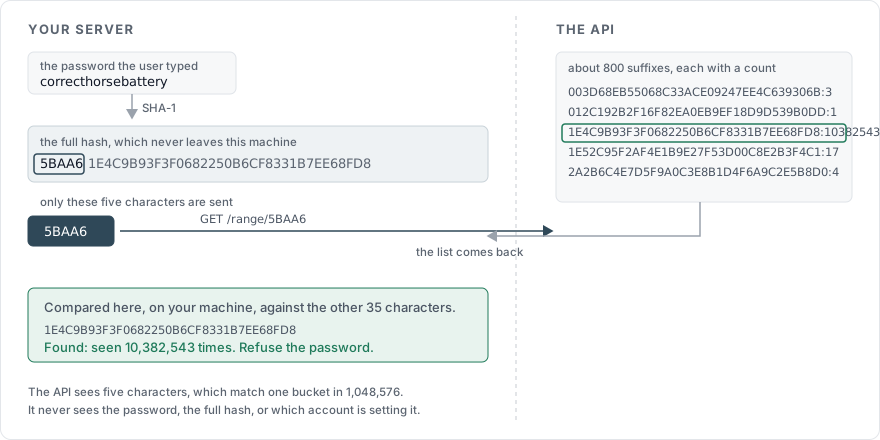
Take password, whose SHA-1 digest is 5BAA61E4C9B93F3F0682250B6CF8331B7EE68FD8. Split it after five characters and request the prefix:
GET https://api.pwnedpasswords.com/range/5BAA6The response is a list of suffixes of every known hash starting with those five characters, each with the number of times it has been seen, around 800 lines of them:
1E4C9B93F3F0682250B6CF8331B7EE68FD8:10382543
003D68EB55068C33ACE09247EE4C639306B:3
012C192B2F16F82EA0EB9EF18D9D539B0DD:1
You search that list on your own machine for 1E4C9B93F3F0682250B6CF8331B7EE68FD8. A match means the password is in the corpus, and the number tells you how often it has been seen. The service learns which of 1,048,576 buckets the password fell into, and each bucket holds hundreds of known hashes plus every unknown password sharing the prefix. That is the k-anonymity model, and it is why this check does not require trusting the operator with anything.
Two options on the request. Add-Padding: true pads the response to a random number of records between 800 and 1000, so an observer cannot infer the prefix from the response size; the padded entries carry a count of 0 and are discarded. ?mode=ntlm switches the corpus to NTLM hashes, for Windows environments.
In code
import hashlib
import requests

def breach_count(password: str) -> int:
    digest = hashlib.sha1(password.encode("utf-8")).hexdigest().upper()
    prefix, suffix = digest[:5], digest[5:]
    response = requests.get(
        f"https://api.pwnedpasswords.com/range/{prefix}",
        headers={"Add-Padding": "true"},
        timeout=3,
    )
    response.raise_for_status()
    for line in response.text.splitlines():
        candidate, _, count = line.partition(":")
        if candidate == suffix:
            return int(count)
    return 0
SHA-1 is doing indexing here and protecting nothing, so its weakness as a signature algorithm does not apply. The value you store is still the argon2id hash from How to hash a password.
Where to run it
| Moment | What to do on a match |
|---|---|
| Registration | Refuse the password and ask for another one. NIST requires a different choice when the value is on the list |
| Password change | Same as registration |
| Password reset | Same as registration, inside the flow in How to build a password reset flow |
| A successful login | Let the login through, then prompt for a change. Blocking here locks out a user who has done nothing wrong today |
Run it once, when the password field loses focus. Have I Been Pwned's own guidance is to check on the blur event, because a prefix sent for every partial password as it is typed exposes several prefixes per password.
When the service is unreachable
Decide this before it happens, because the failure lands on your signup form. We let the password through and log that the check did not run, on the reasoning that an outage which blocks registrations costs more than one weak password that a later pass will catch. Refusing to set a password until the check completes is defensible for an administrative account.
Either way: a 3 second timeout, no retry loop in the request path, and a counter you can alert on.
What to say to the user
This password has appeared in 10,382,543 breached accounts. Choose a different one.
The count belongs in the message. It turns an abstract warning into a number, and it discloses nothing an attacker does not already have. What the message must not do is suggest the password is fine elsewhere, because the corpus is the reason it is not.
Hosting the list yourself
The whole corpus is published for download, ordered by hash or by prevalence, in SHA-1 and NTLM form. A local copy queried with the same prefix scheme removes the network call, which is worth doing for high request volumes or for a system with no outbound internet access. The trade is that you own the update schedule, and a list that is two years old misses two years of breaches.
Sources
Pwned Passwords API, the range endpoint, the k-anonymity model, padding, NTLM mode, and the guidance on when to query
NIST SP 800-63B, on comparing chosen passwords against a blocklist of compromised values
OWASP Authentication Cheat Sheet, on password strength controls and on breached password checks