How to log a login attempt
September 26, 2026 · Updated September 30, 2026
One log line per attempt, carrying when it happened, where it came from, which account it was aimed at, and what the outcome was. The password is never in that line. Neither is the session identifier, the one time code, or the reset token.
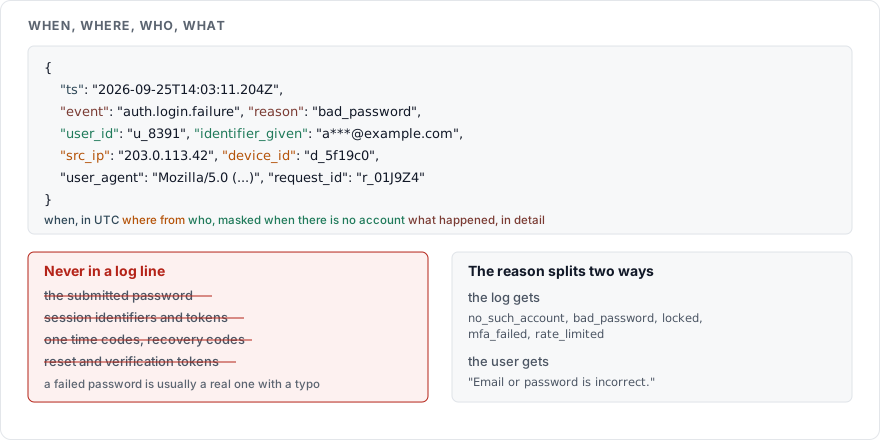
The fields
{
  "ts": "2026-09-25T14:03:11.204Z",
  "event": "auth.login.failure",
  "reason": "bad_password",
  "user_id": "u_8391",
  "identifier_given": "a***@example.com",
  "src_ip": "203.0.113.42",
  "device_id": "d_5f19c0",
  "user_agent": "Mozilla/5.0 (...)",
  "request_id": "r_01J9Z4",
  "mfa": "totp"
}
The OWASP Logging Cheat Sheet asks that every event answer four questions: when it happened, where, who was involved, what happened. It asks for successes as well as failures on authentication, because failed attempts are the early indicator of brute force, credential stuffing and password spraying.
Two of those fields need a decision of your own.
The identifier is the first. Where the account exists, log your internal user id, which is stable and means nothing outside your database. Where it does not exist, you still need something, because a run of attempts against addresses with no account is what enumeration looks like. Log a masked form of what was submitted, and keep it for a shorter period than the rest, since an email address is personal data whether or not it belongs to one of your users.
The reason is the second. The log gets the specific one, and the user gets a single generic sentence, per How to write a login error message. The reason codes worth keeping: no_such_account, bad_password, locked, mfa_failed, rate_limited. Any of them in an HTTP response is an enumeration oracle.
What never goes in
| Never logged | Why |
|---|---|
| The submitted password | A failed password is usually a real password with one character wrong, or the right password for another site. A log full of them is a credential dump with a timestamp |
| Session identifiers | Anyone who can read the log can use them, per How to manage a session after login |
| Access tokens and refresh tokens | Same, with a longer life |
| One time codes and recovery codes | A code in a log that is shipped to a third-party service leaves your trust boundary while it is still valid |
| Reset and verification tokens | The whole point of the token is that only the mailbox holder has it |
| Full personal data | OWASP names sensitive personal data and some forms of personally identifiable information as excluded from logs |
OWASP's exclusion list names authentication passwords, session identification values, access tokens and sensitive personal data outright.
Sanitise what you write
A log line assembled by string concatenation from user input can be forged. A carriage return and line feed inside a submitted email address writes a second line that looks like a real event. OWASP asks for sanitisation of all event data against log injection, naming carriage return, line feed and delimiter characters.
Structured output solves it as a side effect: a JSON encoder escapes the newline, and a field stays a field. If you log lines of text, strip control characters from anything the user supplied before it reaches the formatter.
Clocks
Store UTC, format as ISO 8601 with milliseconds, and synchronise time across every machine that writes a log, which OWASP lists as a requirement for correlating events. A login recorded by the application at 14:03:11 and a block recorded by the proxy at 14:03:09 tell a story. The same two events with drifting clocks tell the wrong one.
Carry a request id through the proxy, the application and any downstream service, so one attempt is one searchable key instead of three guesses.
What to alert on
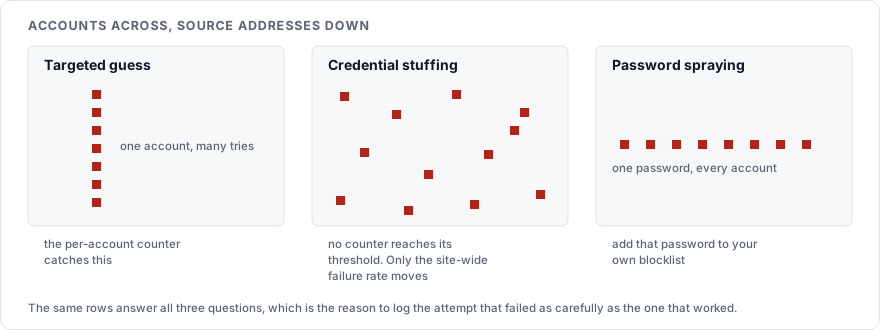
| Signal | What it suggests | Response |
|---|---|---|
| Failures on one account past the threshold within an hour | A targeted guess | Lock for a fixed period and email the holder, per How to rate limit a login page |
| Failures spread across many accounts from few addresses | Credential stuffing | Require a second factor site-wide while it lasts |
| One password tried across many accounts | Password spraying | The same, plus add that password to your local blocklist |
| A success straight after a run of failures on the same account | The guess worked | Notify the holder, end other sessions, ask for a second factor |
| A success from a new country or device on an administrative account | Possible takeover | Step up to a second factor and notify |
| A surge in reset requests | Enumeration, or stuffing looking for a softer route | Rate limit the reset endpoint harder, per How to build a password reset flow |
A dashboard nobody opens is not an alert, so pick the two or three of these that would reach a person at 03:00 and wire those.
Keeping them
Access to the logs is itself recorded, and the right to read them is reviewed, which OWASP states directly. These lines hold an address and an account identifier, which makes them personal data. Article 5(1)(e) of the GDPR requires that personal data is kept "for no longer than is necessary for the purposes for which the personal data are processed", and OWASP puts the same point from the other side: log data must not be destroyed before the retention period and must not be kept beyond it.
Pick a period, write it down, and delete on a schedule that runs whether or not anyone remembers it. Detailed attempt records answer an investigation for weeks; counts and aggregates answer capacity questions for years and carry nobody's address.
Sources
OWASP Logging Cheat Sheet, the event fields, the exclusion list, log injection, clock synchronisation, access control and retention
OWASP Authentication Cheat Sheet, on logging authentication failures and on generic responses
Regulation (EU) 2016/679, Article 5, storage limitation