How to write a login error message
September 26, 2026 · Updated September 30, 2026
Answer every failed login with the same message and the same status code, and take the same time to answer whether or not the account exists. A message that says which half was wrong hands an attacker a list of which addresses have accounts, which is the first thing a credential stuffing run needs.
What a specific message gives away
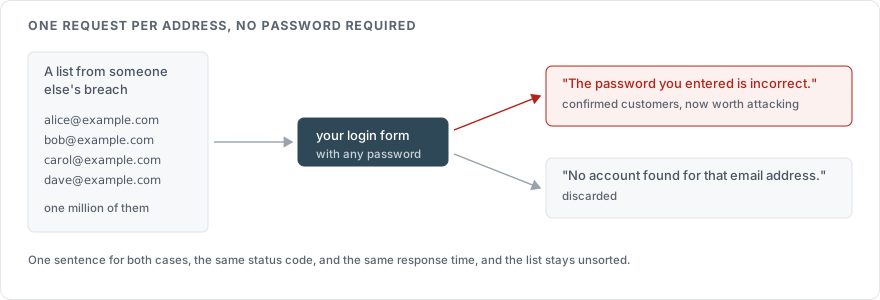
Two responses to a failed login, from the same form:
No account found for that email address.
The password you entered is incorrect.
The first one confirms an address is unregistered. The second confirms it is registered. An attacker holding a list of a million addresses can now sort it into customers and non-customers without a single correct password, at the cost of one request per address. That is account enumeration, and the OWASP Authentication Cheat Sheet lists it as the reason login errors must not distinguish the two cases.
The replacement is one sentence that covers both:
Email or password is incorrect.
A user who mistyped their address gets the same hint they would have got anyway, which is to check both fields.
Three channels leak, and the text is only one of them
The message is the obvious channel. The HTTP status code is the second. If an unknown address returns 404 and a wrong password returns 401, the body text is irrelevant because the attacker reads the status line. Return the same code for both, and 401 is a reasonable choice for both.
Timing is the third channel and the one that survives a careful message. A login handler that looks up the account, finds nothing, and returns immediately answers in a few milliseconds. The same handler with a registered account hashes the submitted password before it can answer, and a password hash is built to be slow. Measured across a few hundred requests, the difference between the two is visible.
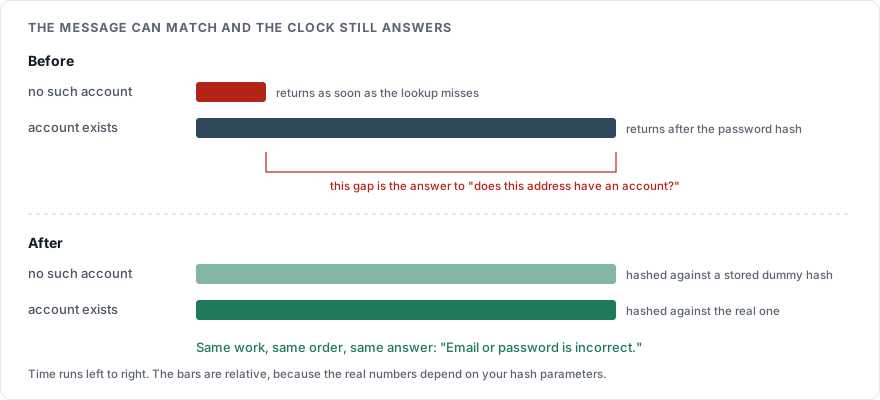
The fix is to do the expensive work in both cases. When the address is not found, hash the submitted password against a stored dummy hash anyway, then return the generic error. OWASP describes this in the same cheat sheet: perform the same operations in the same order whether or not the account exists.
user = find_user(identifier)
stored_hash = user.password_hash if user else DUMMY_HASH
ok = verify(stored_hash, submitted_password)   # runs every time
if user is None or not ok:
    return error("Email or password is incorrect.", status=401)
DUMMY_HASH is a hash of a random string, generated once with the same parameters as real hashes, so that verifying against it costs the same.
The other pages that answer the same question
Fixing the login form is not the end of it, because two other pages take an email address and say something about it.
The password reset form is the easier one. It should respond identically whether or not the address is registered:
If an account exists for that address, we have sent a reset link.
The registration form is harder. A signup form that accepts an already-registered address and lets the user continue produces a confused user with no account. We would tell the user the address is taken, and accept that the signup form is an enumeration point by design. The alternatives are to send the "address already registered" message by email instead of on the page, or to rate limit and monitor registration so that enumeration through it is slow. Pick one of them deliberately. Pretending the form does not leak is the only wrong answer. How to verify an email address at signup carries the same decision through to the verification step.
The messages, side by side
| Page | Leaks the account's existence | Does not |
|---|---|---|
| Login | "No account with that email" | "Email or password is incorrect." |
| Login, locked account | "This account has been locked" | "Email or password is incorrect.", with the lock reported by email to the owner |
| Password reset | "We could not find that email" | "If an account exists for that address, we have sent a reset link." |
| Registration | "That email is already registered" | Same message on the page either way, with the outcome sent by email |
The locked-account row matters more than it looks. A lock message confirms the account exists and tells the attacker their attempts were counted. Report the lock to the account holder, and show the client the ordinary error.
What the user needs instead
A generic message costs the user one thing: it does not tell them whether they mistyped the address or the password. Give that back on the page around the message. A "Forgot your password?" link next to the error covers the second case. An identifier field that accepts an email address, a username or a phone number, per How to secure a login page, reduces the first.
The log is where the specific reason goes, since it is the one place a precise answer costs nothing. How to log a login attempt covers the reason codes.
Sources
OWASP Authentication Cheat Sheet, sections on authentication responses and on preventing enumeration through timing
OWASP Forgot Password Cheat Sheet, on the reset form's response