How to hash a password
September 26, 2026 · Updated September 30, 2026
Use argon2id, and let the library salt each password itself. The minimums in the OWASP Password Storage Cheat Sheet are 19 MiB of memory, 2 iterations and 1 thread. Where argon2 is not available, bcrypt at a work factor of 10 or more will do.
What hashing is for
A hash is a one-way function: the password goes in, a fixed-length value comes out, and there is no way to run it backwards. You store the value and never the password. When the user logs in, you hash what they typed and compare it to what you stored.
The protection this buys is specific. If someone copies your user table, they get hashes and not passwords. Whether that copy is useful to them depends on how expensive it is to guess passwords against those hashes, and that expense is the whole reason the algorithm choice matters.
It buys nothing against a password that is already published in a breach corpus, because the attacker does not have to guess that one. That is a separate check, in How to check a password against known breaches.
Why a general purpose hash is the wrong tool
SHA-256 and MD5 were built to be fast, because checksums and signatures need to run on large data quickly. That property is the opposite of what a password hash needs. An attacker with a copy of your table does not need to reverse anything. They hash a guess and check it against the table. With a fast hash, one consumer graphics card tries billions of guesses a second, at rates the hashcat project publishes as benchmarks, and a table of unsalted SHA-256 hashes falls to a dictionary of common passwords in minutes.
A password hash is designed to be slow and, in argon2's case, to need a lot of memory, so that each guess costs the attacker the same time and memory it costs you. You pay that cost once per login. They pay it once per guess, billions of times.
The choice
| Algorithm | OWASP minimum | Use it when |
|---|---|---|
| argon2id | 19 MiB memory, 2 iterations, 1 thread | Always, when your platform has a maintained library |
| scrypt | N of 2^17, block size 8, parallelism 1 | argon2 is unavailable and scrypt is |
| bcrypt | Work factor 10 or more | Legacy systems, or where neither of the above exists |
| PBKDF2-HMAC-SHA256 | 600,000 iterations | FIPS-140 compliance is required |
argon2id is the variant to use. argon2i and argon2d exist for other purposes, and argon2id combines their properties for password storage. The memory parameter is what makes it hard to attack on graphics cards, which have a lot of compute and comparatively little fast memory per core.
Salt, and why you do not manage it yourself
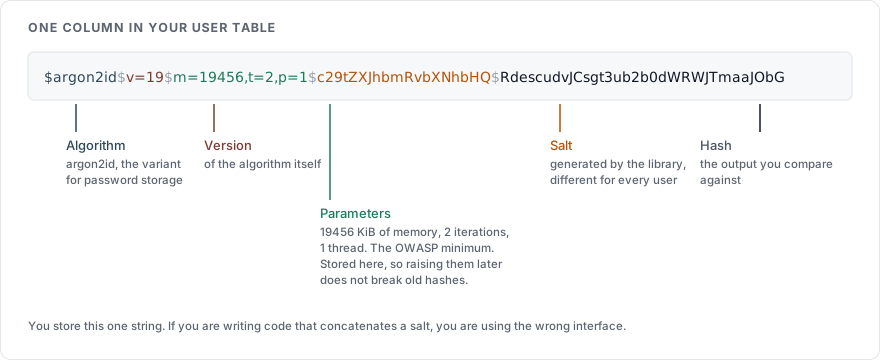
A salt is a random value stored alongside the hash and mixed into it, so that two users with the same password get different hashes and a precomputed table of common passwords is useless. Every algorithm in the table above salts for you. The library generates the salt and stores it inside the hash string. When verifying, it reads the salt back from there. If you find yourself writing code that generates or concatenates a salt, you are using the wrong interface.
Pepper, which is optional
A pepper is a single secret value, kept outside the database in configuration or a key store, mixed into every hash. Its purpose is narrow: if the database is copied but the application configuration is not, the hashes cannot be attacked at all. OWASP describes it as an additional layer on top of a slow hash, never a replacement for one. Add it if you can keep it somewhere the database is not, and rotate it by rehashing on login.
The bcrypt limit
bcrypt reads at most 72 bytes of the password and ignores the rest. A user with an 80 character passphrase is protected by its first 72 bytes only, and two passphrases that share their first 72 bytes are the same password to bcrypt. Enforce a maximum length at the form if you use bcrypt, and tell the user what it is. Pre-hashing the password with SHA-256 to fit it under the limit is a known workaround with its own pitfalls that OWASP documents. argon2id has no such limit and avoids the question.
In code
With the argon2-cffi library in Python, the whole of it is:
from argon2 import PasswordHasher

ph = PasswordHasher(memory_cost=19456, time_cost=2, parallelism=1)

stored = ph.hash(password)            # salt generated and embedded

ph.verify(stored, submitted)          # raises on mismatch

if ph.check_needs_rehash(stored):     # parameters have been raised since
    stored = ph.hash(submitted)
The memory cost is in kibibytes, so 19456 is 19 MiB. Set the parameters once, in one place, and raise them over time as hardware gets faster.
Moving an existing system
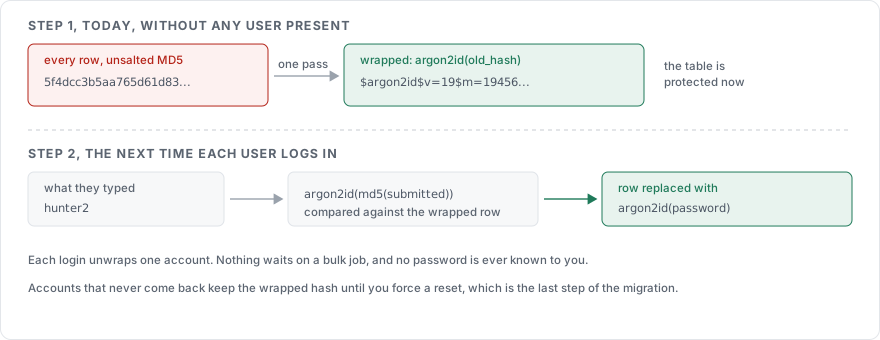
You cannot rehash passwords you do not have, and you do not have them. The migration happens one user at a time, at login:
Store the name of the algorithm next to each hash.
On login, verify with the algorithm the stored hash was made with.
If it verifies and the algorithm is not the current one, hash the submitted password with the current algorithm and replace the stored value.
After a period, force a reset for accounts that have not logged in and still carry the old hash, through the flow in How to build a password reset flow.
For hashes that are unsalted or use a fast algorithm, there is a faster path: wrap them. Compute argon2id(old_hash) for every row in one pass and mark each row as wrapped. On login, compute argon2id(md5(submitted)) and compare. The table is protected immediately, and step 3 above unwraps each account to a plain argon2id hash the next time its owner logs in.
What never goes in the database
The plain password never goes in the database, at any point. It stays out of log lines and error messages as well, and it is never placed in a URL. How to log a login attempt covers what a log line holds instead. If your framework logs request bodies, exclude the password field by name before the first user registers.
Sources
OWASP Password Storage Cheat Sheet, the parameters in the table, salting, peppering, the bcrypt limit, and upgrading legacy hashes
NIST SP 800-63B, on storing memorized secrets with a salt and an approved key derivation function
argon2-cffi documentation, the API used above
hashcat benchmarks, for the guess rates of fast hashes on consumer hardware