How to build a password reset flow
September 26, 2026 · Updated September 30, 2026
A reset link is a single-use token of at least 128 random bits, sent only to the address on file and dead within the hour. When the password changes, every other session on the account ends and the owner gets an email saying so. The reset flow is a second login with no password on it, which is why it gets attacked more than the form it sits behind.
Why the reset flow is the target
A login form checks a secret the attacker does not have. A reset form checks whether the attacker can receive an email, or guess a token, or reuse one. Each of those is a weaker test, and any of them getting through gives the attacker a new password of their choosing. The OWASP Forgot Password Cheat Sheet is the reference for what follows, and the Web Security Testing Guide is the list of ways testers break it.
Step 1, the request
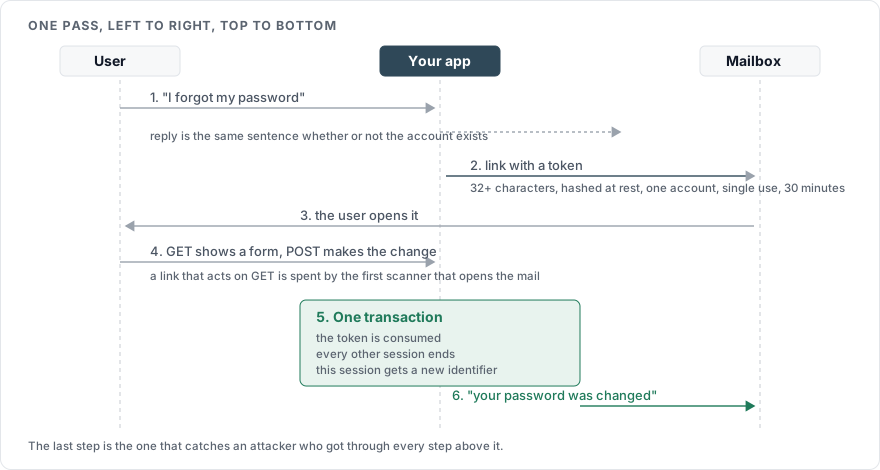
The user enters an identifier. The page responds with the same message whether or not an account exists:
If an account exists for that address, we have sent a reset link. It expires in 30 minutes.
Send the email only if the account exists, and only to the address already on file. Never let the request specify where the email goes. Rate limit this endpoint by address and by account the same way as the login form, because a reset request costs you an email and costs the attacker nothing.
Step 2, the token
Generate the token from the operating system's cryptographic random source, with at least 128 bits of entropy. In Python that is secrets.token_urlsafe(32), which yields 256 bits in a 43 character URL-safe string. Store a hash of the token, and compare against the hash when it comes back, so that a copy of your database does not contain live reset links.
Give the token three properties and enforce all of them on the server:
It is bound to one account.
It can be used once, and is deleted or marked the moment it is consumed.
It expires, and OWASP suggests a window between 15 minutes and an hour. Shorter is safer, and 30 minutes covers a user who has to find their phone.
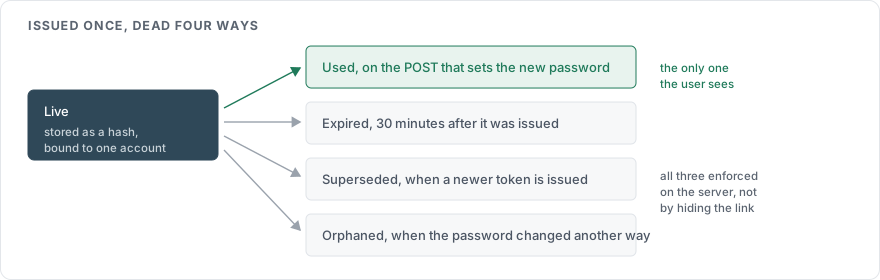
Issuing a new token should invalidate any earlier unused ones for the same account.
Step 3, the link
Put the token in the URL of a page served over HTTPS, and make that page a form. The page that loads when the link is clicked must not change anything by itself. It shows the new-password form, and the change happens on the POST that follows. A link that resets the password on GET is consumed by every email scanner, link preview and antivirus that fetches it before the user does.
Set Referrer-Policy: no-referrer on the reset page so that the token is not sent to any third-party resource the page loads. Better still, load no third-party resources on it.
Step 4, the change
The form asks for the new password and nothing else. It does not ask for the old one, because the user does not have it, and it does not ask security questions, which NIST SP 800-63B removed from its list of acceptable authenticators.
Apply the same password rules as registration, per How to secure a login page, including the check against known breaches in How to check a password against known breaches. Then hash the new password the same way as any other, per How to hash a password.
Rate limit submissions of the token itself. A 43 character random token cannot be guessed. A shorter code can be, and the endpoint that accepts it should stop responding after a small number of failures either way.
Step 5, after the change
Four things happen in the same transaction as the password update:
The token is invalidated.
Every other session for the account is ended, so that whoever was logged in with the old password is logged out. The OWASP Session Management Cheat Sheet lists a password change as an event that must invalidate existing sessions.
The current session, if the user was somehow logged in, is renewed with a fresh identifier, per How to manage a session after login.
An email goes to the address on file saying the password was changed, with the time and a way to reach support if it was not them.
The notification is the control that catches an attacker who got past everything above. A user who did not request a change and receives that email has a few minutes to act.
What to leave out
Do not email the user a new password, or their old one. The password should never exist in plain text outside the form field.
Do not use a short numeric code by email or SMS as the whole mechanism. Six digits is a million guesses, and without strict rate limiting that is an afternoon's work. NIST restricts SMS as a delivery channel for this class of weakness.
Do not put the token in a URL that consumes it on GET.
Do not reuse the same token format for email verification or magic links without the same single-use and expiry rules. How to verify an email address at signup covers where the two differ.
The sequence in one view
| Step | Server does | User sees |
|---|---|---|
| Request | Look up the account, send email only if found, rate limit | The same sentence either way |
| Token | Random, 128 bits or more, hashed at rest, one account, single use, 30 minute expiry | A link in their inbox |
| Link | Serve a form over HTTPS, no referrer, no side effects on load | A new-password form |
| Change | Validate the password, hash it, consume the token | Confirmation |
| After | End other sessions, renew the current one, notify by email | Logged in on this device only, and an email |
Sources
OWASP Forgot Password Cheat Sheet, the token properties, the expiry window, the generic response
OWASP Session Management Cheat Sheet, session invalidation on password change
OWASP Web Security Testing Guide, reset functionality, how the flow gets tested
NIST SP 800-63B, on knowledge-based questions and on SMS as a restricted channel