How to manage a session after login
September 26, 2026 · Updated September 30, 2026
Issue a new session identifier the moment the login succeeds, and put it in a cookie the browser will not hand to JavaScript or to another site. Two clocks end the session after that: one for idle time, one for total age. Logging out has to destroy the server's copy, because expiring the cookie only hides it.
The cookie
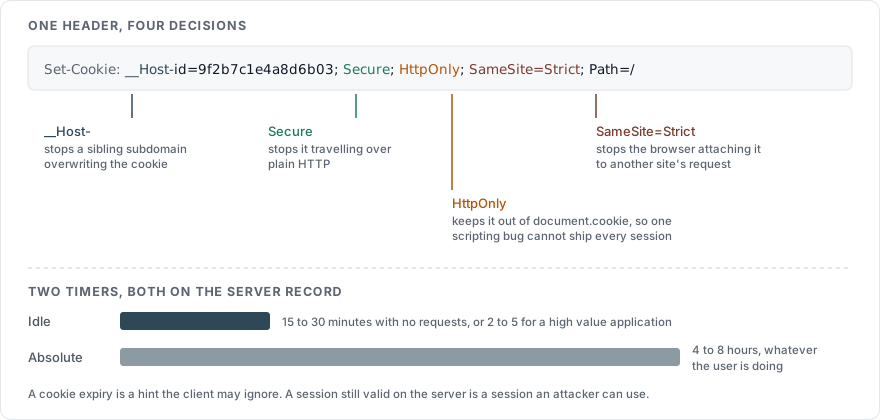
One header carries the whole decision:
Set-Cookie: __Host-id=9f2b7c1e4a8d6b03f5e1c9a2d7b4e806; Secure; HttpOnly; SameSite=Strict; Path=/| Attribute | What it stops |
|---|---|
Secure | The cookie travelling over plain HTTP, where anyone between the user and you can read it |
HttpOnly | document.cookie reaching it, so a cross-site scripting bug cannot ship the session off the page |
SameSite=Strict | The browser attaching it to requests another site started, which is most of cross-site request forgery |
__Host- prefix | A page on a sibling subdomain overwriting it. The prefix is only honoured when the cookie is Secure, has no Domain, and has Path=/ |
Path=/ | Nothing on its own here, and the prefix requires it |
The OWASP Session Management Cheat Sheet states that session cookies must set SameSite=Strict where possible and Lax otherwise, and that SameSite=None is never used without Secure. Add Cache-Control: no-store to any response that sets one, so a shared proxy does not keep a copy.
The identifier
The value in that cookie comes from a cryptographic random source and carries at least 64 bits of entropy. OWASP puts the floor there and notes that 16 hexadecimal characters reach it. Framework defaults sit well above it, and an identifier built from a counter or a timestamp sits well below.
It should mean nothing by itself. Encoding the user id or the role into the value hands your data model to anyone who decodes one, and it invites an attacker to edit the value into another account. The server keeps a table mapping the identifier to the account, and the client keeps a number that is useless without that table.
Rename it while you are there. A framework default announces your stack to anyone reading a response header, which is the first step in choosing an exploit: PHPSESSID for PHP, JSESSIONID for Java, ASP.NET_SessionId for .NET. OWASP suggests a generic name such as id, which tells a reader nothing about what is serving the page.
Regenerate it on every change of privilege
A session fixation attack works by planting a known identifier in the victim's browser before they log in, then reusing it afterwards. The defence is one line of code in the login handler: throw the pre-login identifier away and issue a new one once the password and any second factor have been checked.
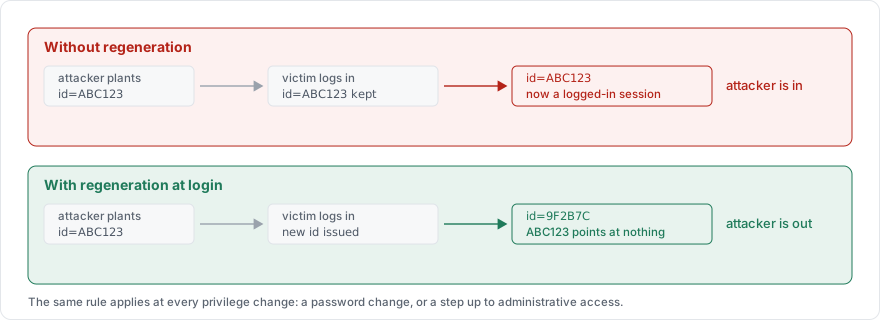
OWASP puts it as a requirement that the identifier is renewed after any privilege level change. In practice that means a fresh identifier at login, and another one whenever the account's rights change, which covers a password change and a step up to administrative access. Ordinary navigation keeps the same identifier, and rotating it on every request breaks the back button and multiple tabs for no gain.
The two timers
| Timer | Ends the session | Values from OWASP |
|---|---|---|
| Idle | After a period with no requests | 15 to 30 minutes for low risk applications, 2 to 5 minutes for high value ones |
| Absolute | After a fixed period, whatever the user is doing | 4 to 8 hours for an application used through a working day |
Both are enforced on the server, on the session record. A cookie Expires date is a hint the client is free to ignore, and a session that is still valid server-side after the cookie is gone is a session an attacker can use.
Long-lived sign-in is a separate mechanism. Raising the absolute timeout to a month gives you month-long sessions, which is the thing you were trying to avoid. Keep the remembered device as its own single-use token in its own cookie: each use exchanges it for a fresh session and replaces the token, so a stolen copy stops working the next time the real user returns.
Logging out
Three things happen, in this order:
Delete the session record on the server. The framework has a call for it:
HttpSession.invalidate()in Java,Session.Abandon()in .NET,session_destroy()in PHP. The record has to go whether or not the cookie does.Overwrite the cookie with an expired one, so the browser drops it.
Send
Clear-Site-Data: "cache", "cookies", "storage"on the logout response, which tells the browser to clear what the page left behind.
Logging out everywhere is the same operation against every session record for that account. A password change runs it for you, per How to build a password reset flow.
Not in local storage
OWASP is blunt about where a session identifier does not go: do not store authentication tokens, session identifiers, JSON web tokens, refresh tokens or any credential in localStorage or sessionStorage. Anything reachable by JavaScript in the origin is reachable by injected JavaScript in the origin, which turns one cross-site scripting bug into every account it can reach.
A single-page application that wants a token in the browser wants an HttpOnly cookie and a small server in front of its API, holding the token and attaching it to outgoing calls. OWASP names that the backend-for-frontend pattern.
What to record
Every login and every session invalidation is worth a log line, and the identifier itself never appears in one. How to log a login attempt covers the fields.
Sources
OWASP Session Management Cheat Sheet, the entropy floor, the cookie attributes, the timeout ranges, regeneration on privilege change, and the warning about web storage
OWASP Cross-Site Request Forgery Prevention Cheat Sheet, on what
SameSitedoes and does not coverNIST SP 800-63B, on reauthentication and session bindings