How to add two factor authentication
September 26, 2026 · Updated September 30, 2026
A second factor is another proof, kept somewhere the password is not. Offer a passkey where the account can use one and a code from an authenticator app where it cannot, per How to choose between passkeys and one time codes. Enrolment is where the mistakes concentrate: a secret written to the database in the clear, or a user who switches the feature on without once proving the app works.
Enrolment, in order
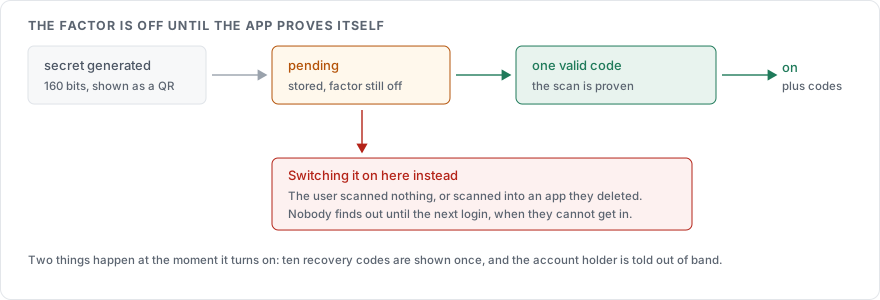
Generate 160 random bits from the operating system's cryptographic source and encode them in base32. RFC 4226, which TOTP builds on, requires at least 128 bits and recommends 160.
Render the secret as a QR code holding an
otpauthURI, and print the encoded string underneath it for anyone typing it into a password manager by hand.Store the secret against the account with the factor still switched off, until the user submits one valid code from it. Skip this and a user who scanned nothing, or scanned into an app they then deleted, is locked out at the next login.
Issue ten single-use recovery codes, display them once, and store them hashed the way passwords are, per How to hash a password.
Tell the account holder out of band. The OWASP Multifactor Authentication Cheat Sheet asks for notification through a separate channel whenever a factor changes, which catches an attacker enrolling their own device on an account they have already taken.
The URI from step 2:
otpauth://totp/How%20To%20Guides:alice@example.com?secret=JBSWY3DPEHPK3PXPJBSWY3DP&issuer=How%20To%20Guides&algorithm=SHA1&digits=6&period=30The label before the colon and the issuer parameter both matter. They are what the user reads in a list of twenty accounts, and leaving them generic produces an entry called "Account".
Checking a code
The parameters come from RFC 6238. The counter is the Unix time divided by a 30 second step, counted from the epoch. The code is six digits derived with HMAC-SHA-1. An authenticator app assumes those defaults, so changing them means the user's app disagrees with your server.
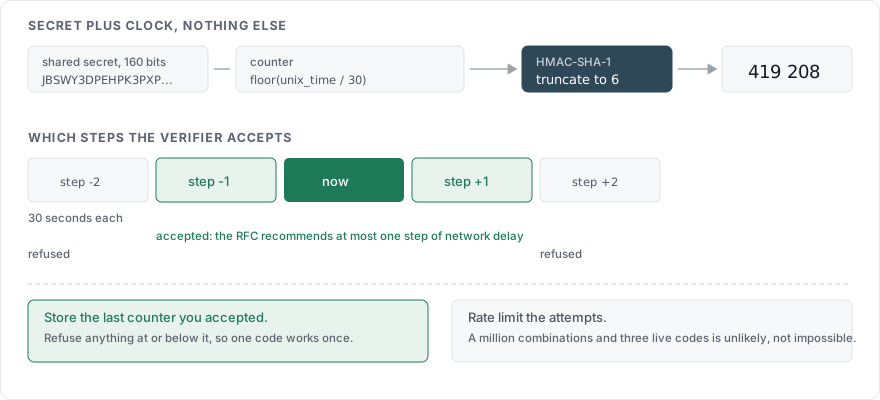
Three rules on the verifier side:
Accept one step either side of the current one. The RFC recommends at most one time step of network delay, which covers a user typing the last digit as the code rolls over.
A code works once, which the RFC makes normative: the verifier must not accept a second attempt of a code after the first has validated. Store the counter value you last accepted for that account and refuse anything at or below it.
Limit the attempts, because six digits is a million combinations and a window of three live codes makes a blind guess unlikely without making it impossible. OWASP asks for strict attempt limits. We use the same escalating delay as the password, per How to rate limit a login page, counted separately so that failing the code does not consume the password's budget.
With pyotp, the server side is four lines:
import pyotp

secret = pyotp.random_base32()                 # 160 bits, base32
totp = pyotp.TOTP(secret)                      # 30 s step, 6 digits, SHA-1
uri = totp.provisioning_uri(name="alice@example.com", issuer_name="How To Guides")

ok = totp.verify(submitted_code, valid_window=1)
valid_window=1 is the one step either side. Single use and rate limiting are yours to add around it, because the library cannot know what you have already accepted.
Storing the secret
The shared secret is worth what the password is worth. Anyone holding it generates valid codes for that account indefinitely, and unlike a password it never changes on its own.
It cannot be hashed, because the server needs the value back to derive a code. Encrypt it at rest with a key held outside the database, in a key management service or the application's configuration, so that a copy of the user table alone yields nothing. It never appears in a log line or an email. Analytics events are logs with a different name, so it stays out of those too. The only place it appears in plain form is the enrolment page, over HTTPS, and the recovery codes are hashed the moment they are shown.
Changing or removing a factor
Require the password and the current factor before any change to the factor settings, which OWASP states as reauthentication with an existing enrolled factor. Notify out of band afterwards, including on removal.
Removing the last factor from an account with administrative rights is a decision worth making harder: we refuse it in the interface and require a second administrator, because an attacker who can turn the protection off has not been slowed down by it.
Who has to have it
| Account | Policy |
|---|---|
| Administrators and anyone who can read other users' data | Required, and a passkey where the device allows one, a code where it does not |
| Accounts holding payment details or personal data | Offered at signup and prompted afterwards |
| Everyone else | Offered, never forced |
| Any account, during a credential stuffing run | Required at login where a factor is enrolled, until the site-wide failure rate drops |
The last row is the one that pays for itself. The site-wide failure counter from the rate limiting page is the signal, and raising the requirement for a few hours costs enrolled users one extra step.
Recovery
A factor that cannot be recovered becomes a support queue. Recovery codes issued at enrolment answer it for most accounts, and the recovery path has to be no weaker than the factor: no security questions, and no code sent to the same phone number that is already the factor. How to choose between passkeys and one time codes covers the trade-offs per factor type.
Sources
RFC 6238, the time step, the drift window, and single use of a code
RFC 4226, the shared secret length
OWASP Multifactor Authentication Cheat Sheet, attempt limits, reauthentication before changes, out-of-band notification, and recovery codes
NIST SP 800-63B, on authenticator types and on SMS as a restricted channel
Key URI format, the
otpauthparameters