How to choose between passkeys and one time codes
September 26, 2026 · Updated September 30, 2026
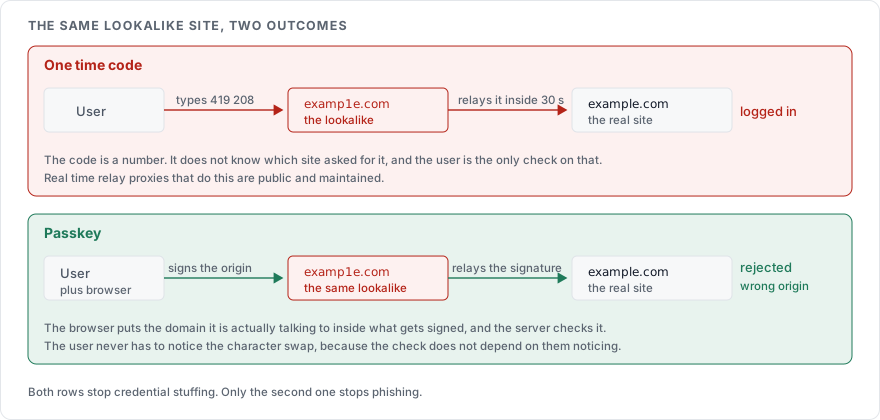
Offer passkeys before anything else. An authenticator app code is the fallback for anyone who cannot use one, and SMS belongs only alongside another factor, never on its own. The order is about phishing: a passkey is bound to your site's address and cannot be handed to a lookalike, while a code is a number the user will type into whatever page asks for it.
What each one is
A one time code, the kind from an authenticator app, comes from a secret shared between the app and your server at setup. Every 30 seconds both sides derive a six digit number from the secret and the clock, per RFC 6238. The user reads the number off the app and types it in. An SMS code is the same idea with your server generating the number and texting it.
A passkey is a public and private key pair. The private half lives on the user's device, in the phone's secure hardware or a password manager, and never leaves it. At login, your server sends a random challenge, the device signs it with the private key after the user approves it with a fingerprint or a PIN, and your server checks the signature against the public key it stored at setup. The standard is WebAuthn, and "passkey" is the FIDO Alliance's name for a WebAuthn credential that syncs across a user's devices.
Where codes fail
A code is a number the user types into a page. If the page is a copy of yours on a lookalike domain, the user types it there. The attacker forwards it to the real site within its 30 second window. Proxies that do this in real time, Evilginx among them, are public and maintained. The code stopped credential stuffing, because the attacker did not have it, and did nothing against phishing, because the user handed it over.
SMS codes have a second failure that authenticator apps do not: the number can be taken. A SIM swap, where the attacker convinces the carrier to move the victim's number to a new SIM, delivers every code to the attacker. NIST SP 800-63B classes codes delivered over the phone network as a restricted authenticator for this reason, and requires that users be offered an alternative.
Why a passkey resists phishing
The private key signs the challenge together with the origin the browser is talking to. A passkey registered for example.com will not sign for examp1e.com, because the browser includes the origin in what gets signed and the server checks it. The lookalike site receives nothing it can forward. The user does not have to notice the domain, because the browser did.
A code depends on the user's judgement at the moment of typing it. A passkey removes the judgement from the loop.
Side by side
| Passkey | Authenticator app code | SMS code | |
|---|---|---|---|
| Stops credential stuffing | Yes | Yes | Yes |
| Stops real time phishing | Yes | No | No |
| Survives a SIM swap | Yes | Yes | No |
| Needs a phone signal | No | No | Yes |
| Lost device | Recover from a synced copy or a backup code | Backup codes, or re-enrol | Backup codes, or re-enrol |
| User effort at login | Unlock the device | Open app, read, type | Wait for text, read, type |
| NIST 800-63B status | Phishing resistant | Acceptable | Restricted |
How to roll it out
Add passkey registration and login, and present it first on the login page. Current browsers and operating systems cover the mainstream; check caniuse for WebAuthn for the platforms your users are on.
Keep authenticator app codes as the second option for accounts that cannot use a passkey yet. How to add two factor authentication covers the enrolment and verification of those codes.
If you offer SMS at all, offer it only alongside something else and never as the sole second factor.
Require a second factor for administrator accounts, per How to secure a login page.
Issue backup codes at enrolment: ten single-use random codes, shown once, stored hashed the same way as passwords per How to hash a password.
Recovery is the part to design first
Any second factor can be lost, and the recovery path is a login that skips it. A recovery flow that asks security questions, or sends a code to the same phone, undoes the protection. Backup codes generated at enrolment are the plain answer. For high value accounts, recovery through a support process with identity checks is slower and safer.
Sources
NIST SP 800-63B, on restricted authenticators and phishing resistance
WebAuthn Level 3, W3C, the standard behind passkeys and origin binding
RFC 6238, TOTP, how authenticator app codes are derived
OWASP Multifactor Authentication Cheat Sheet, on choosing and recovering factors