How to rate limit a login page
September 26, 2026 · Updated September 30, 2026
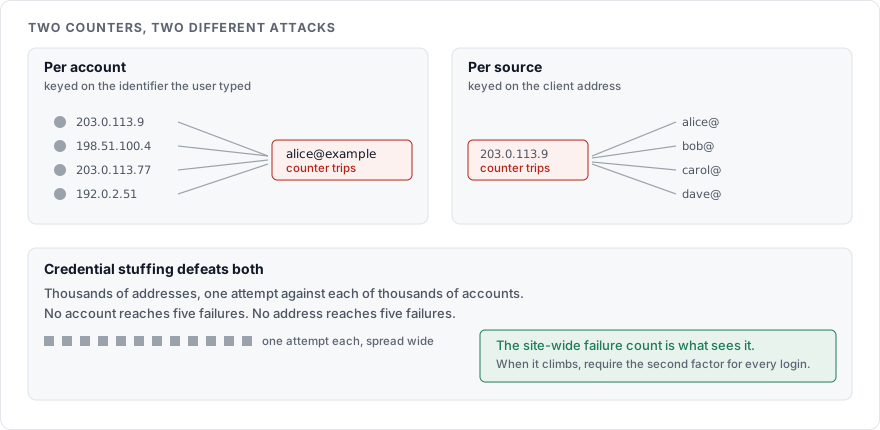
A login page needs two rate limits: one per account, one per source address. It also needs a delay that grows with each failure, long before it needs a lockout. Lockouts come last, because a locked account is something an attacker can create on purpose.
Why one counter is not enough
A single limit keyed on the IP address is the easiest thing to add, and it is the first thing a credential stuffing attack is built to get around. Credential stuffing is the replay of email and password pairs taken from someone else's breach, and the tooling behind it spreads attempts across thousands of addresses so that no single one trips a threshold. Each address makes a handful of attempts against a handful of accounts and moves on.
A single limit keyed on the account has the opposite weakness. It stops a slow guess against one victim, and it hands anyone who holds a list of your customers' email addresses a way to lock all of them out at once. Five wrong passwords per address and the whole customer base is waiting for a timer.
Both limits are needed, and they answer different questions. The OWASP Authentication Cheat Sheet describes per-account lockout as a control that can be abused to deny legitimate users access, and recommends pairing it with limits that do not depend on the account at all.
The two counters
| Counter | Keyed on | Catches | Misses |
|---|---|---|---|
| Per account | The identifier the user typed | A slow guess against one victim, from anywhere | Many accounts tried once each |
| Per source | The client address, plus a device cookie if you set one | One address hammering many accounts | Attempts spread across a botnet |
Keep them in separate stores so that resetting one does not reset the other, and count failures only. A successful login should not add to either.
Slow down before you lock
A delay that grows with each failure does most of the work a lockout does, without the denial of service. The person who mistyped a password waits a second. The script making its fortieth attempt waits minutes. No one is locked out, and support does not get the call.
An example policy, which you should adjust to your own traffic:
| Consecutive failures on one account | Response |
|---|---|
| 1 to 4 | No delay |
| 5 | 2 second delay before the response |
| 6 | 4 seconds |
| 7 | 8 seconds |
| 8 and above | 30 seconds, capped |
| 20 within an hour | Temporary lock for 15 minutes, with an email to the account holder |
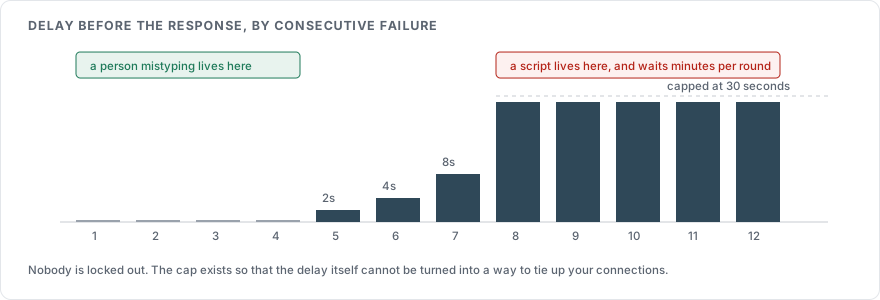
The delay belongs on the server, before the response is sent, so that a client cannot skip it by ignoring a wait instruction. The numbers are a starting point. The shape is what to keep: free attempts for typos, a steep rise for scripts, and a cap so that the delay itself cannot be used to tie up your connections.
When you do lock
If you lock an account, lock it for a fixed time and tell the account holder by email, with the time and the source address of the attempts. Do not tell the client that made the attempts. The response to a locked account's login should look the same as a wrong password, for the reasons in How to write a login error message.
A permanent lock that needs a support call is a denial of service you run against yourself. If you need something stronger than a timed lock, require the second factor on the next attempt instead of refusing the attempt.
Credential stuffing needs a different signal
Rate limits by account and by address both assume the attacker concentrates somewhere. Credential stuffing does not concentrate, so it needs a control that does not depend on volume. The OWASP Credential Stuffing Prevention Cheat Sheet lists multi-factor authentication as the strongest single defence, and behind it, a blocklist of passwords known from breaches so that the replayed pair fails whatever the rate. How to check a password against known breaches covers that query, and How to add two factor authentication covers the factor.
Two cheaper signals help. A long-lived device cookie set on a successful login lets you treat a known device more gently than an unknown one. A count of failures across the whole login endpoint, independent of account or address, tells you that a stuffing run is under way even when no single counter fires. When that site-wide rate climbs, you can require the second factor for every login until it drops.
Where the limit lives
A rate limit at the edge, in a reverse proxy or a CDN rule, sees the address and the path and nothing else. It is worth having, and it is not enough on its own. The per-account counter has to know which account was tried, and only the application knows that. Enforce the per-account limit in the application, after the request is parsed and before the password is checked.
Check the limit before hashing the password. The hash is the expensive step by design, and an attacker who can make you compute thousands of them per second has found a different denial of service.
What to record
Log every failed attempt with the account identifier, the source address, the time, and the outcome. Never log the password that was tried. A failed password is often a real password with one character wrong, and a log file full of them is a breach waiting to be read. How to log a login attempt covers the fields and the signals worth an alert.
The reset endpoint gets the same limits
The password reset request is a second login page with weaker rules, and the same two counters apply to it. How to build a password reset flow covers what else it needs.
Sources
OWASP Authentication Cheat Sheet, on lockout as a denial of service and on delays as the alternative
OWASP Credential Stuffing Prevention Cheat Sheet, on why volume-based limits miss stuffing and what to use instead
NIST SP 800-63B, on limiting failed attempts and on breached-password blocklists